New Music Mondays: Pop Music

Trying to stay ahead of the trend in pop music? If you’re a music-download junkie like I am, you are always looking for new music to use in class or to keep those finicky teens engaged. This article will hopefully give you some new resources.

  • Top 40 – Find pop hits from around the world. The USA chart will be very similar to the Billboard site, but check out top hits from other countries for some unique music from your class. My favorites are France, World Latin, and World Dance/Trance.

  • Radio Disney – Check the Top 30 Countdown for all the hits that your tweens are listening to. Bonus: You can rest assured that all of these songs are age-appropriate.

Disclaimer: Of course you will still have to do the usual bad-words check before playing any song in class–which may also require translation for the world songs, which leads to my next resource:

  • YouTube – It’s probably not your first thought for new music, but you can find remixes, mash-ups and radio versions of popular songs that are often available to download from the user who created them. Type in a song and you will find remixed versions, mash-ups and edited radio versions.

Next week’s New Music Monday will have another new music resource for remixes and mash-ups!

Looking for past New Music Mondays?

New Music Mondays: Ballet Music

Looking for some new ballet music?

Here are our current favorites:

1. Aly Tejas – Music for Ballet Class III Music

Described as “haunting” and “beautifully melodic”, her album Music for Ballet Class III is one of her best and most recent. You can’t really go wrong with any of her stuff, but we especially love this album.

2.Dancing Fingers Volume 8 – Michael Roberts Dancing
We’ve been using Michael Roberts’ album “Between the Barres” for years, but his new album, “Dancing Fingers” is another classic. 34 songs, most of them between 1 and 2 minutes makes them perfect for class.

3. We’ve mentioned Sunny Choi in a previous New Music Monday post – but she has some cool covers… available for FREE on Facebook.

4. Musique de la Danse (Ballet Class) – Fernando Davil 

Enjoy!

New Music Mondays: Using iTunes to Make Class Playlists

As a dance teacher in the twenty-first century, you can carry thousands of songs in your pocket.

However, just because you can, doesn’t mean you should. Or in our case – at least organize it!

At my studio, I have many teachers who opt for CDs over iPods because scrolling through hundreds of songs to find the perfect tempo for their tap class wastes time and is too frustrating to deal with during class.

And what happens when you forget to take it off shuffle and dance music suddenly crosses over with your ‘personal’ music and you have a taste for raunchy hip hop songs or death metal? Not quite appropriate for those Kindergartners you’re teaching.

I propose a solution!

If you use iTunes, the software allows you make playlists. Use this feature. LIBERALLY.

Here’s how I do it (and you can too!):

1. DANCE MUSIC LIBRARY – Make a playlist for each type of dance you teach. We’ll call these your Dance Library Lists. To make a playlist, click File -> New Playlist. In my case, I have a Ballet, Children’s music, Jazz, Lyrical, Modern, Salsa, Showtunes and Tap playlist.
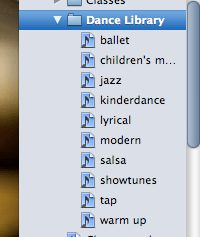
Then drag and drop music that fits these categories from your Music Library into the playlists. Each of these playlists will have hundreds of songs. Here is my ballet library playlist – it has 200+ songs and full CDs of ballet music.
2. CLASS PLAYLISTS – Now make a playlist for each class you teach. If I am teaching a combination class of tap & jazz, I will often make two playlists. I label mine by the day and time “Tues. 5 – Jazz” or “Tues. 5 – Tap” or “Adult Tap Class”.

Hint: You’ll notice I have my playlists labeled with a number in front of them. iTunes organizes alphabetically, so Thursday will come before Tuesday if you just label it by day. I add the number in front of it because I am anal and need my classes to be in order!

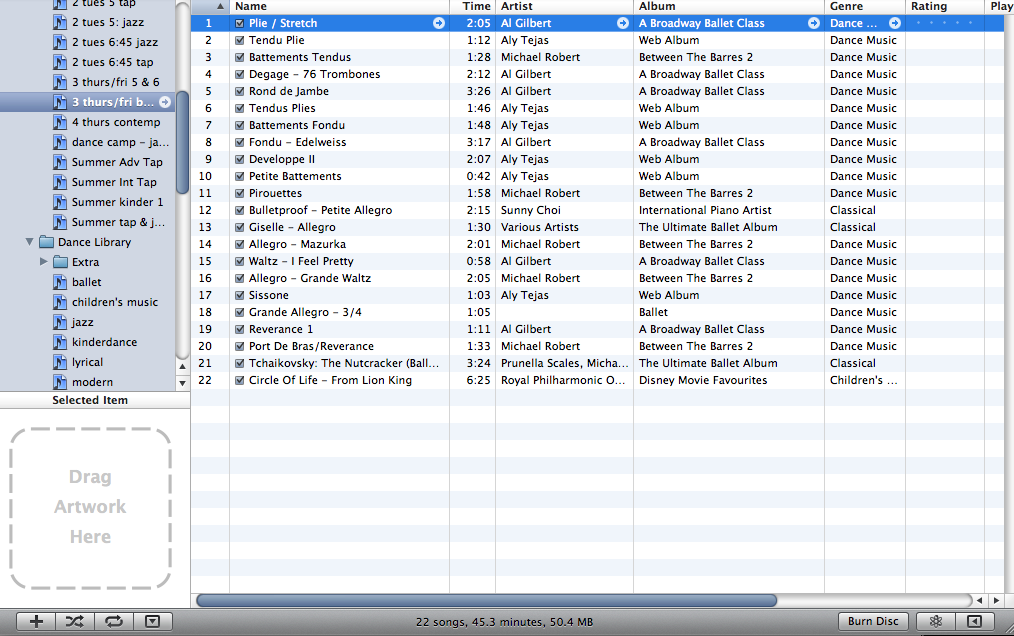
These playlists are much smaller and I often re-arrange them each month or so to bring in new music. To get new music, I just have to go back to my Dance Library Lists and pull a few songs from there. Here is my Thursday/Friday ballet class playlist. It has 23 tracks. Enough to get through the class and then whatever piece of choreography we are working on that day is at the bottom:
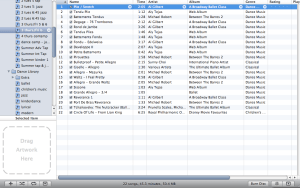

Hint: For my tap classes, I organize my playlist by the tempo. This way, I can find the correct speed in class quickly.

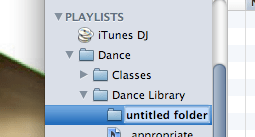
3. Use the folder feature. To make a new playlist folder, go to: File -> New Playlist Folder

Label it something useful (Example: “Classes” folder and “Dance Library” folder) and drag and drop your playlists into that folder.Hopefully this organization system will help you to use your iPod during class and you will be able to quickly navigate thousands of songs.
Choreography Playlists
> Choreography: All the songs I am currently choreographing. This makes it easy to find when I am out and want to listen to my songs.

> Potential Choreography: Whenever I hear a song that gives me an idea for a piece, I drop it into this playlist. Even if I can’t use it right away, it’s there, stored away where I can find it.

Hope this has helped you get organized for class!

New Music Mondays: SYTYCD

Because I only have until Thursday to be obsessed about this season of So You Think You Can Dance, this week’s New Music Monday is all about the music featured on the show.

if you’re looking for an original song you won’t hear anywhere else, SYTYCD pretty much guarantees you won’t find that. You can safely bet that a song used on SYTYCD will be overused on the competition circuit this upcoming season. BUT it is a great place to find new artists!

The other option is to use a song that isn’t used in a dance, but is used during a montage or other part of the show. SYTYCD seems to unearth good songs by little-known artists.

How To Find Your Song
So – you’re looking for a song and didn’t catch the split-second subtitle or you missed this week’s episode. What to do? Go to the Fox website? Not much help. If only there was someone who tirelessly reviews each episode and posts a comprehensive list each week… Enter PureSYTYCD!

This blog, which is all about SYTYCD all the time, had a great list of music posted after each episode. If the song is available on iTunes, she even posts the link directly to the iTunes store!

You are our SYTYCD music savior! Thank you!

Our Favorites From Season 7
Here are our favorite new artists we discovered this season thanks to SYTYCD:
Florence + The Machine (basically the whole album “Lungs”) Lungs
Lissie (“Everywhere I Go”)Lissie
Black Gold (“Shine”)Shine
Christina Perri (“Jar of Hearts”)Jar
Janelle Monae (“Tightrope”)Janelle

More New Music Monday posts

New Music Mondays: Sunny Choi

We have a fun way to spice up your ballet class! Today’s New Music Monday is all about the piano artist, Sunny Choi.

Sunny plays classical piano covers over Top 40 hits and many are available on her Facebook page for FREE download. Not all will work for ballet class because of changing tempos and unusual phrasing, but here are a few of our favorites:

“Why Don’t We Just Dance” (Josh Turner) – use for: Tendu, Degage, Frappe, Petite Allegro

“Alejandro” (Lady Gaga) – use for: Ron De Jambe / Tendu / Petite Allegro

“Temporary Home” (Carrie Underwood) – use for: Adagio

“Your Love Is My Drug” (Ke$ha) – use for: Petite Allegro

“Haven’t Met You Yet” (Michael Buble) – use for: Degage, Frappe, Pique turns

From her Facebook page:

“Sunny Choi…has a rare gift called “perfect pitch” and this talent allows her to play almost any musical selection that she hears without the aid of written music. Sunny has spent the last decade fine-tuning her gift and has developed her business “Sunny Choi Music” around her love of music and powerful talent.”

Now go and enjoy the free downloads!

New Music Mondays: Pandora Radio

Looking for new music?

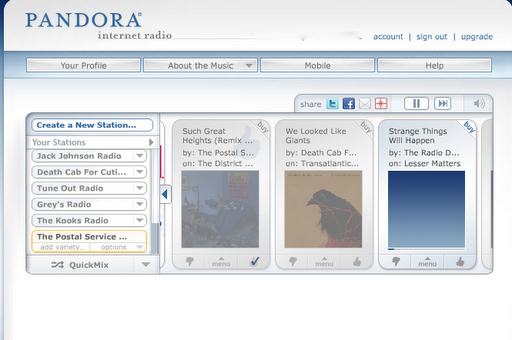
Pandora Radio is a great resource for finding music! It’s a web “radio station” – to use it, you type in an artist or song and it starts playing music that is similar, creating a station. You can make as many stations as you want.

One of my favorite features is that it let’s you “bookmark” artists or songs for later. I like to let Pandora play in the background while doing office work and if a song catches my ear, I’ll “bookmark” it for later. That way if I’m at work, I can bookmark the song to download when I get home later.


What I don’t like: Commercials and Time limits. Pandora used to be a free service, but then it decided it should make money (don’t we all want to?) and so now there are “commercial” breaks. They’re only like 30 seconds, but it is annoying. Also they have a time limit on how many hours a month you can listen to (somewhere around 40 hours). I haven’t run out yet because I only listen to it a few hours a day, but its something to watch out for.

So there you have it – my unsolicited review of Pandora Radio! Hope you discover some new artists!