
As a dance teacher in the twenty-first century, you can carry thousands of songs in your pocket.
However, just because you can, doesn’t mean you should. Or in our case – at least organize it!
At my studio, I have many teachers who opt for CDs over iPods because scrolling through hundreds of songs to find the perfect tempo for their tap class wastes time and is too frustrating to deal with during class.
And what happens when you forget to take it off shuffle and dance music suddenly crosses over with your ‘personal’ music and you have a taste for raunchy hip hop songs or death metal? Not quite appropriate for those Kindergartners you’re teaching.
I propose a solution!
If you use iTunes, the software allows you make playlists. Use this feature. LIBERALLY.
Here’s how I do it (and you can too!):
1. DANCE MUSIC LIBRARY – Make a playlist for each type of dance you teach. We’ll call these your Dance Library Lists. To make a playlist, click File -> New Playlist. In my case, I have a Ballet, Children’s music, Jazz, Lyrical, Modern, Salsa, Showtunes and Tap playlist.
 Then drag and drop music that fits these categories from your Music Library into the playlists. Each of these playlists will have hundreds of songs. Here is my ballet library playlist – it has 200+ songs and full CDs of ballet music.

2. CLASS PLAYLISTS – Now make a playlist for each class you teach. If I am teaching a combination class of tap & jazz, I will often make two playlists. I label mine by the day and time “Tues. 5 – Jazz” or “Tues. 5 – Tap” or “Adult Tap Class”.
 Hint: You’ll notice I have my playlists labeled with a number in front of them. iTunes organizes alphabetically, so Thursday will come before Tuesday if you just label it by day. I add the number in front of it because I am anal and need my classes to be in order!
These playlists are much smaller and I often re-arrange them each month or so to bring in new music. To get new music, I just have to go back to my Dance Library Lists and pull a few songs from there. Here is my Thursday/Friday ballet class playlist. It has 23 tracks. Enough to get through the class and then whatever piece of choreography we are working on that day is at the bottom:
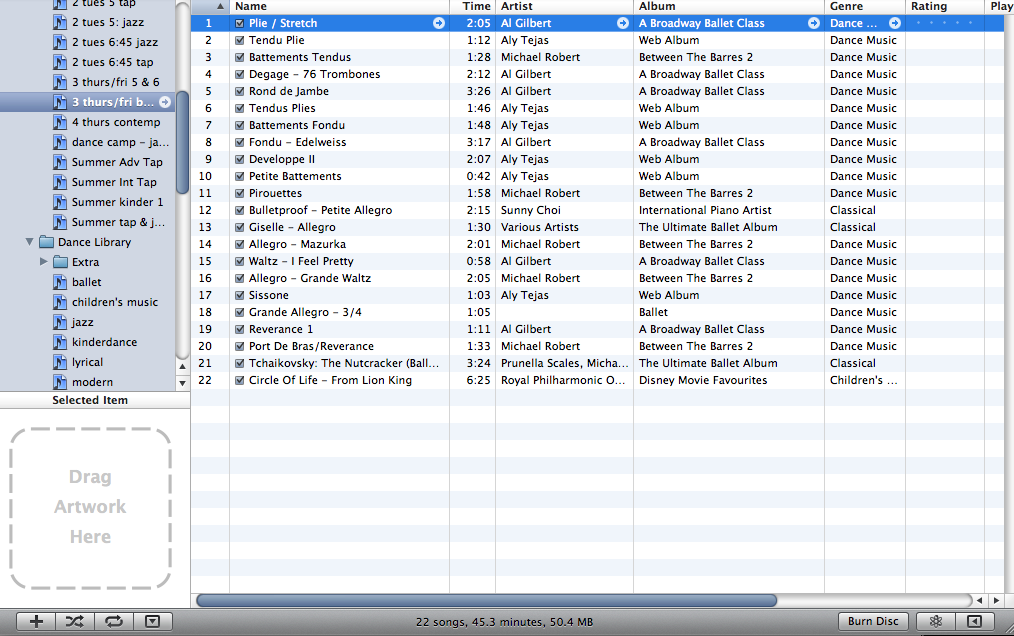
Hint: For my tap classes, I organize my playlist by the tempo. This way, I can find the correct speed in class quickly.
3. Use the folder feature. To make a new playlist folder, go to: File -> New Playlist Folder
 Label it something useful (Example: “Classes” folder and “Dance Library” folder) and drag and drop your playlists into that folder.
 Hopefully this organization system will help you to use your iPod during class and you will be able to quickly navigate thousands of songs.
Choreography Playlists
> Choreography: All the songs I am currently choreographing. This makes it easy to find when I am out and want to listen to my songs.
> Potential Choreography: Whenever I hear a song that gives me an idea for a piece, I drop it into this playlist. Even if I can’t use it right away, it’s there, stored away where I can find it.
Hope this has helped you get organized for class!



 The Dance Buzz